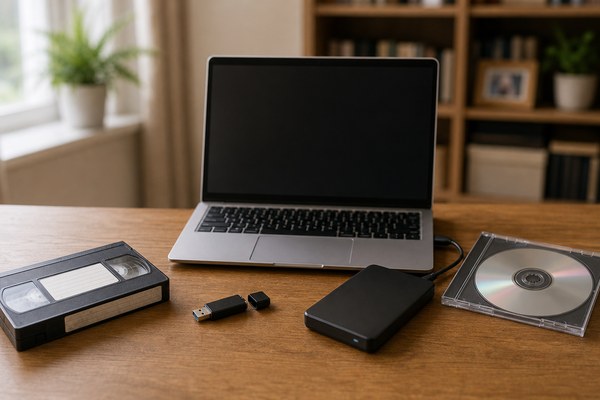
What is the best digital format for old family tapes: MP4, USB, hard drive or DVD?
What is the best digital format for old family tapes: MP4, USB, hard drive or DVD?
If you are converting old family tapes in Burnley, Lancashire, one of the most useful decisions is choosing the right output format. People often compare MP4, USB, hard drive and DVD as if they are direct alternatives, but they are different parts of the same picture. MP4 is a file format, while USB, hard drive and DVD are delivery or storage methods.
That means the real question is not just “which one is best?” but “best for what?” For most households, the strongest answer is: MP4 as the main video format, then stored on USB or hard drive, with DVD only if your family wants disc playback.
Start with the right comparison
Before deciding, it helps to separate file type from storage medium.
File format
This is the actual digital video file you will watch, copy and back up. In most family-archive situations, MP4 is the most practical choice.
Storage or delivery medium
This is where the file lives when you receive it or back it up. That might be a USB stick, an external hard drive, a computer or a disc.
Quick comparison table
| Option | What it is | Best for | Main drawback |
|---|---|---|---|
| MP4 | Digital video file format | Everyday playback, sharing and backup | Still needs good storage habits |
| USB stick | Physical delivery medium | Easy handover of files | Easy to misplace and not ideal as the only backup |
| External hard drive | Larger-capacity storage medium | Big family archives and multiple files | Can fail if it is the only copy |
| DVD | Physical disc playback format | Relatives who prefer a disc player | Less flexible and harder to back up |
Why MP4 is usually the best main format
MP4 works well because it is widely compatible across laptops, phones, tablets, smart TVs and common software. It is also easy to duplicate, move between devices and include in a long-term family archive.
MP4 advantages
Strong compatibility
Most households can open MP4 files without specialist software.
Easy sharing
Relatives can receive copies without needing original tapes or a disc player.
Better archive flexibility
You can store MP4 files on different devices and in multiple backup locations.
For a closely related service page, see Burnley, Lancashire Tape to MP4 for Simple Sharing and Storage.
When USB is useful
USB is not a competing format against MP4. It is simply a convenient physical way to receive MP4 or other digital files. For smaller archives, it can be a practical delivery option because it is simple to hand over and easy for most families to plug into a computer or television.
Best use for USB
- A modest number of family video files
- Easy gifting to another family member
- Quick first copy before the files are moved elsewhere
USB limitation
A USB stick should not be your only archive. It is too easy to lose, damage or forget in a drawer.
When a hard drive is better
If you have a larger archive, especially one built from many VHS, Hi8, VHS-C or MiniDV tapes, an external hard drive can make more sense than a small USB stick. It gives you more capacity and can hold organised folders by year, event or family branch.
Best use for a hard drive
- Large video collections
- A master archive with many files
- Families who want one organised long-term storage location
Hard drive limitation
A hard drive is useful, but it still should not be the only copy. One drive is a storage device, not a backup strategy.
Where DVD still fits in
DVD is still useful in some Burnley, Lancashire households, especially where parents or grandparents prefer simple television playback. But DVD is usually better treated as a viewing copy than as the main preservation format.
Good reasons to choose DVD as an extra
- Someone in the family finds discs easier than files
- You want a straightforward TV playback option
- You also plan to keep digital files as the real archive
Related page: Burnley, Lancashire DVD + Digital for Easier Family Playback and Backup.
Best choice by situation
| Your situation | Best answer |
|---|---|
| You want the most future-friendly option | MP4 |
| You want a simple physical handover for a small archive | MP4 on USB |
| You have a large archive from many tapes | MP4 on external hard drive |
| You need easy playback for older relatives | MP4 plus DVD |
| You want the safest family archive | MP4 with at least two backups |
What does Tape to Digital UK make easiest?
The homepage positioning is clear: digital files are meant for easier backup and sharing, and many customers also choose DVD alongside digital. That aligns with the most practical answer for families in Burnley, Lancashire. In other words, the best “format” is often not one single thing. It is a combination:
- MP4 as the main file type
- A sensible delivery medium such as USB or drive
- Optional DVD if your household wants it
Tape to Digital UK also states a typical turnaround of 7 to 14 days after tapes are received, which helps families plan the archive process more confidently.
Cost considerations
Exact pricing depends on the number of tapes, file output and whether you want additional storage media. As a broad UK guide, conversion often lands around £8 to £20+ per tape, with extra delivery media or disc copies increasing the total. That is why it helps to decide upfront whether you need a simple working copy, a full archive or both.
Frequently asked questions
Is MP4 better than DVD?
For long-term flexibility, yes. MP4 is easier to copy, back up and share. DVD is better treated as an extra playback format.
Is a USB stick enough on its own?
No. It is a convenient delivery method, but it should not be your only archive copy.
Should I use a hard drive for a big family archive?
Yes, often. A hard drive is usually better than a small USB stick for larger collections, as long as you also keep a second copy elsewhere.
What is the safest overall setup?
MP4 files stored on your main device, copied to an external backup, and optionally duplicated in cloud or off-site storage.
Final answer
For most Burnley, Lancashire families, the best digital format for old family tapes is MP4, then stored sensibly on a USB stick or hard drive, with DVD added only if the household still wants disc playback. The smartest archive is the one that is easy to watch today and easy to protect tomorrow.
Need help choosing the best output for your family tapes? Visit https://tapestodigital.uk/ to start your enquiry with Photo Hippo Ltd in Burnley, Lancashire.
